Switching Dispatch Software: What Actually Happens in 21 Working Days
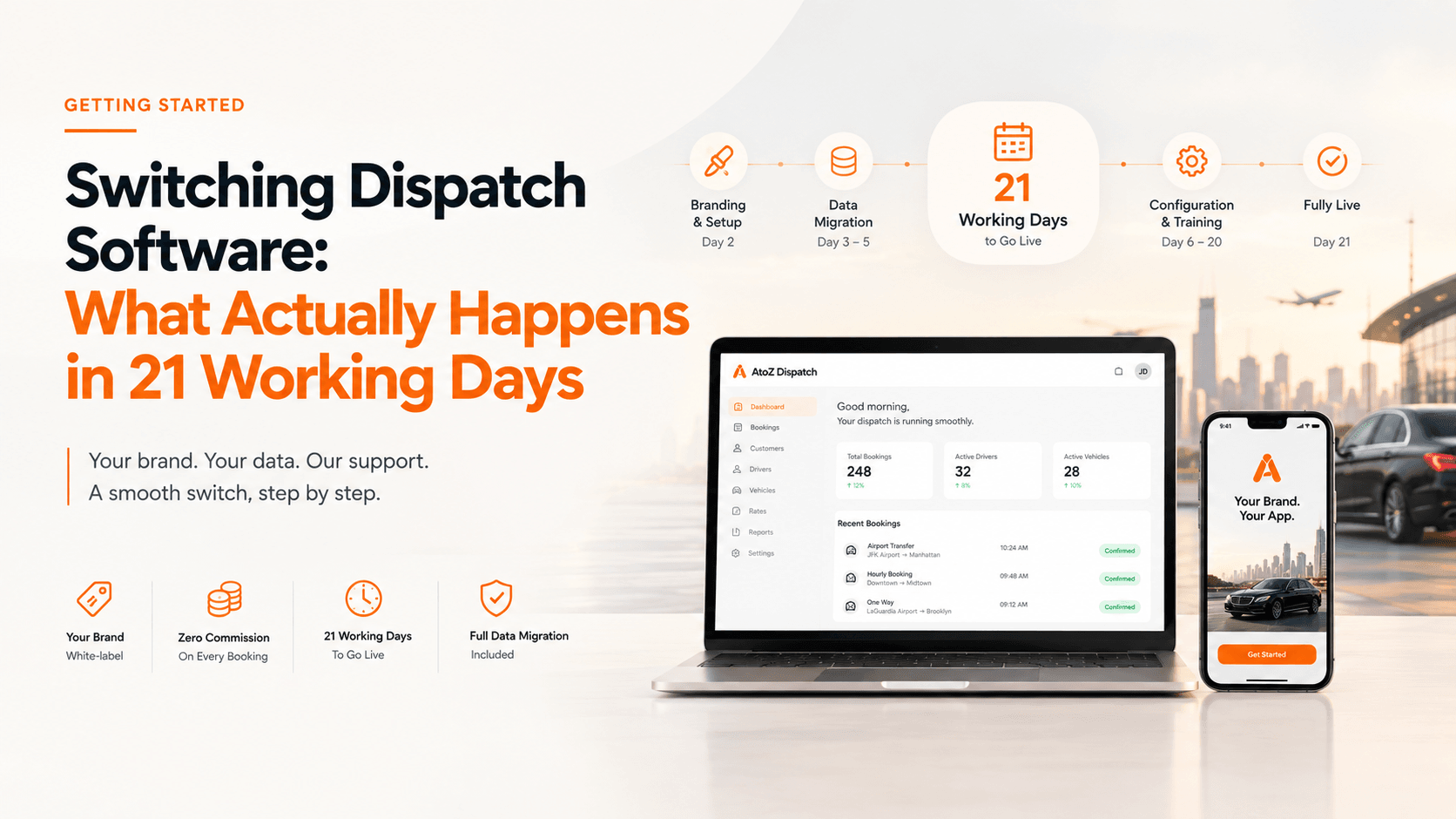
Team plans go fully live in 21 working days. Branding is applied early — your logo, colours and domain. Migration of your data, rates and zones is included in the plan and handled with you, not handed to you. You are not switching everything on day one, and you are not left to configure it alone.
Key points
- 21 working days for a Team plan to go fully live. That is the figure to plan around.
- Migration is included in the plan and done with you, not handed over as a task.
- Branding is applied early, so what you are testing already looks like your business.
- Your rates, zones and vehicle classes are set up as part of onboarding.
- The work you actually have to do is decisions, not data entry.
- Nobody should switch a live dispatch operation in a weekend, and we will not pretend otherwise.
"Switching sounds like a nightmare" is the single most common reason operators put this off. Not price, not features. The fear of a fortnight of chaos with bookings falling through the gap.
So here is the timeline with nothing rounded down. A Team plan is fully live in 21 working days, and most of the work is not yours.
The fear, named
It is worth saying out loud what people are actually worried about, because it is three separate things and they have three separate answers.
Downtime. That there will be a period where the old system is off and the new one is not ready, and bookings arrive into neither.
Lost data. That the client list built over years arrives with half the phone numbers missing, or does not arrive at all.
Retraining everyone. That drivers who have used one app for three years will not use another, and every one of them will ring you about it in the same week.
All three are reasonable. None of them requires you to run two systems in parallel and hope.
Day 1 — credentials and the onboarding call
Your account is created and credentials arrive. An onboarding call is booked within 24 hours, scheduled in your time zone rather than ours.
That call is where the configuration questions get asked properly: how you price, how you dispatch, what your vehicle classes are, which airports you work, what your cancellation policy is. It is worth having your current rate card in front of you.
Nothing switches over on day one. Your existing system keeps running throughout.
Day 2 — branding
Your logo, colours and company details are applied across the platform and both mobile apps.
This takes under an hour of work and it happens early for a practical reason: everything you look at from this point on carries your own name, so what you are reviewing is your product rather than a demo of ours.
Days 3 to 5 — migration
Your client list, driver profiles and booking history are migrated across by the AtoZ team.
There is no manual data entry on your side. You provide an export from your current system — we will tell you exactly what format and help you get it if the old vendor is unhelpful about it — and the mapping and import is our work.
This is also where the "lost data" fear gets settled, because you review the result. The client count should match. Spot-check the records you know well: your biggest corporate account, the regular with the unusual address, the driver who has been with you longest.
Through to day 21 — configuration, drivers, training, go-live
The remaining time covers the work that cannot be rushed without producing exactly the mess people fear.
Rate configuration. Your fixed prices, distance bands, zone matrix, hourly rates, airport fees, waiting time, surcharges and the windows where peak, holiday or night rates apply. Then testing them — every Rate Manager tab has an inline calculator, and the ten journeys you do most often get run through it before anything goes live.
Driver setup. Accounts for each chauffeur, vehicle assignments, document records.
Training. For you and your team on the dispatch side, and for drivers on the app. The driver side is genuinely quick, because a driver app is a short list of things: see the job, accept it, navigate, mark it done.
Deployment. The apps are published under your own developer accounts and go live.
Your old system stays running until the new one is ready. The changeover happens when you say so.
Why we do not say "a week"
Because it is not a week.
Some vendors quote seven to ten days for this, and some pages have said that in our own name in the past. That number is wrong for a Team plan and we would rather correct it than keep it.
A timeline you cannot stand behind costs more than it wins. The operator who was told seven days and goes live on day nineteen has spent twelve days losing confidence in everything else they were told. The operator who was told 21 working days and goes live on day nineteen is pleased.
Same date. Very different relationship.
Support after go-live
Two different things get run together here, so both plainly.
The direct line is open to everyone. Call, SMS or WhatsApp on 302 499 1612, on any plan, new customer or existing. There is no tier of this product that stops you picking up the phone.
What the plans differ on is the dedicated channel attached to your account — the route your support goes through day to day, rather than the only way you are permitted to reach us.
PlanDedicated support channelTeam 5Email and ticketTeam 25Adds Google MeetTeam 50Adds WhatsApp supportTeam 100Adds phone support
If something is stuck rather than broken — you cannot work out how to configure a rate, or a driver has a question about the app — there is a training and onboarding appointment you can book directly rather than opening a ticket and waiting.
What you actually have to do
Totalled up, your side of the 21 days is roughly this:
- One onboarding call.
- An export from your current system, or an introduction to whoever can produce it.
- A review of the migrated data — an hour, well spent.
- Sign-off on the rate card after testing your ten most common journeys.
- Training sessions for yourself and your team.
Everything else is our work. That is the difference between switching being a project you have to run and switching being a project you have to attend.
Frequently asked questions
Q: How long does it take to switch dispatch software?
A: Team plans go fully live in 21 working days. Migration, setup and onboarding are included in the plan.
Q: What do I actually have to do?
A: Make decisions and answer questions about your rates, zones, vehicle classes and policies. The data work is done with you rather than left to you.
Q: Is migration an extra cost?
A: No. Setup, onboarding and migration are included on every Team plan.
Q: Will my business be disrupted during the switch?
A: The point of a staged 21 working days is that it is not. You are not moving a live operation overnight.
Q: Can it be done faster?
A: We do not promise faster for a Team plan, because a rushed cutover is how operators lose bookings. The Solo Booking plan is live in 48 hours, but it is a booking link rather than a dispatch operation.

Written by the A to Z Dispatch team
We build white-label dispatch software and AI employees for limo, taxi, chauffeur and airport transfer businesses. About us