Invite Your First Team Driver
How to Invite Your First Team Driver, and What He Sees
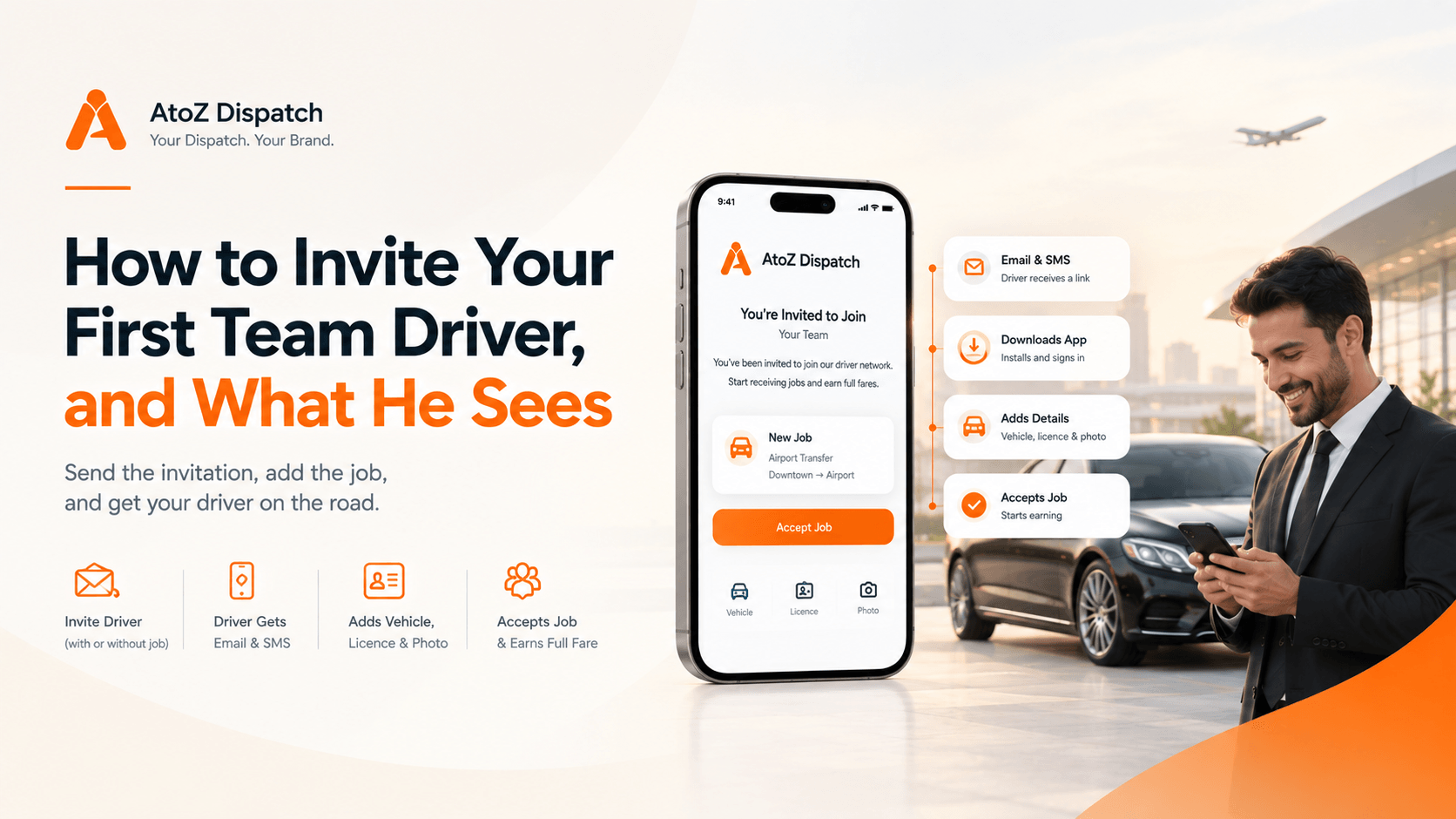
Send the invitation from the driver app, with a job attached or on its own. Your driver receives an email and an SMS with a link, downloads the app, and adds three things — vehicle, licence and photo — before accepting. There is no application or approval queue. Agree the split, standards and response time before you send it.
Key points
- Three signs you are ready: turning work away most weeks, no full day off in a month, regulars asking about a second car.
- Ask a driver you already know and would put your own reputation behind. The first handover sets what you think is possible.
- You can send the invitation with a job attached, so his first contact with your team is a paid trip.
- He gets an email and an SMS, downloads the app, adds vehicle, licence and photo, then accepts.
- Agree the split, cancellations, cash, presentation and response time first. It takes ten minutes.
- Check with your accountant and insurer how a team driver is classified where you operate.
The first driver you add is the one that changes how your week works. Everything after that is repetition.
The mechanics take about a minute. The part worth thinking about is what you agree before you send the invitation, because that is what decides whether the second handover happens.
Are you ready? Three signs
You are turning down work. Not occasionally. Most weeks.
You have not had a full day off in a month. Every job is yours because there is nobody else to give it to.
Regulars have started asking whether you have a second car. That question is a customer telling you they would give you more work if you could take it.
If none of those are true, you do not need a team yet. If two are, you needed one a while ago.
Who to ask first
One name. A driver you already know and would put your own reputation behind.
Not the cheapest. Not the most available. The one whose car you have seen and whose timekeeping you trust, because the first handover sets what you think is possible. If it goes badly with someone you barely knew, you will conclude that delegating does not work, when what actually happened is that you picked the wrong person.
Sending the invitation
There are two ways, and they suit different moments.
With a job attached. You have work in your hand right now that you cannot run. Send the invitation with that job in it. The driver's first contact with your team is a paid trip.
On its own. No job today, but you know next month is busy. Register the driver to your team now so the team exists before you need it.
Most operators should use the first. A real job is a far better invitation than an explanation.
What your driver actually receives
Worth knowing, because he will ring and ask you.
He gets an email and an SMS with a link to download the app.
He installs it and adds three things: his vehicle, his licence, and a photo.
Then he can accept the job.
That is the whole flow. There is no account to apply for, no approval queue, no waiting on us.
The three items exist because a customer is getting into his car, and you should know what car and who is driving it.
What to agree before you send it
Have this conversation first. It takes ten minutes and prevents most of what goes wrong later.
The split. What he keeps, what comes back to you, and when. Agree it before a good job makes it awkward.
Cancellations and no-shows. If the passenger does not show, who wears it. Decide once, in the calm.
Cash. If a passenger pays cash, what happens to it and how fast.
Presentation. Vehicle, dress, whether he opens the door. Your name is on the trip.
Response time. How quickly you expect a yes or a no. If he cannot answer in ten minutes during a working day, you need to know now.
One more, and it is not optional: check with your accountant and your insurer how a team driver is treated where you operate. Employment status, insurance and licensing vary by state and by country. This is the part that costs real money if it is wrong.
Your first handover
Pick a job you were going to turn down anyway.
That is deliberate. There is nothing at risk — you had already written it off — so you get to watch the whole flow with no pressure. He accepts, he drives it, he earns the fare, and you see it land in the My Team console.
If it goes well, the second one is easy. Within a month you will hand over work without thinking about it.
What if he does not accept?
The job comes back to you inside the response window. You take it back and drive it, or send it to somebody else.
This is worth saying because it is the fear that stops people. The job does not vanish into someone else's phone. It returns.
How to start with us
If you are already on AtoZ, the invitation is in your driver app now.
If you are weighing it up: Team 5 is $149 a month plus a $499 one-time setup, Team 25 is $299 plus $699, and Team 50 is $399 plus $799. Team 25 is the common choice. Setup, onboarding and migration are included, and so are unlimited vehicles and unlimited reservations. There is no commission on any booking — not on yours, and not on the ones you hand to your team.
Everything is under your own brand: your logo, your domain, your app-store accounts. The driver downloads your app. Team plans are fully live in 21 working days.
If you would rather see the invitation flow before you commit, book a demo at atozdispatch.com/book-demo, or call, text or WhatsApp 302 499 1612. We have worked with operators since 2006.
Frequently asked questions
Q: How do I add a driver to my team in the driver app?
A: Send an invitation, either with a job attached or on its own. The driver receives an email and an SMS with a link to download the app.
Q: What does my driver have to add before he can accept a job?
A: Three things: his vehicle, his licence and a photo. Then he can accept.
Q: Is there an approval process or a waiting period?
A: No. There is no application queue and nothing to wait on. The three items exist because a passenger is getting into his car.
Q: Can I add a driver before I have work for him?
A: Yes. You can register a driver to your team with no job attached, so the team exists before the busy week arrives.
Q: What should I agree before sending the first invitation?
A: The split and when he is paid, who wears a no-show, what happens to cash, presentation standards, and how fast you expect a yes or no.
Q: Do I need to worry about employment status?
A: Yes, and it is worth proper advice. Employment status, insurance and licensing for team drivers vary by state and country. Speak to your accountant and your insurer.